Community Training Classes & Labs > F5 Programmability Training Index
Lab 3.2 – Execute an f5-newman-wrapper for Build
Your environment has already been seeded with 5 f5-newman-wrapper files, these
files will execute against the collections noted in the previous lab. This lab
will cover the Build aspect, creating a Virtual Server Framework containing all
the pieces required for this demo service.
..NOTE:: This is a Postman Collection, and can be imported into the client for viewing
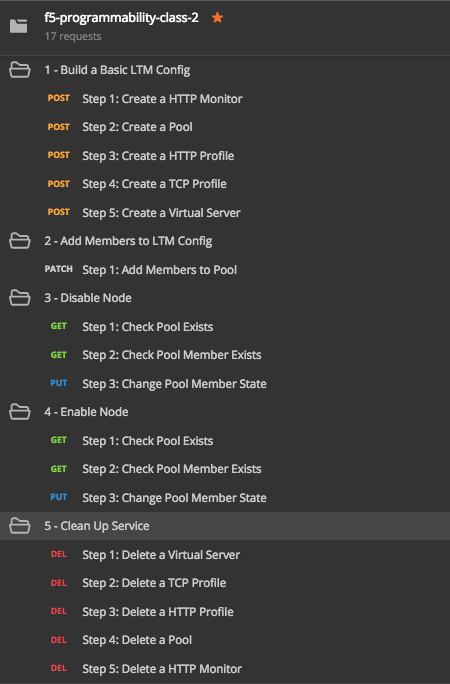
For a visual reference of what f5-programmability-class-2.postman_collection.json looks like:
注釈
You do not need to have all these operations individually broken out, it is shown this way to educate that Workflows can be as small (update a pool member) or as large (deploy a whole service) as needed
Task 1 - Examine f5-newman-build-1
注釈
The contents of this folder contain files for this lab and upcomming labs in this class
Open Putty and connect to the
super-netops-containeruser credentials aresnopsanddefaultNavigate to the location containing the f5-newman-wrapper files
cd ~/f5-automation-labs/jenkins/f5-newman-buildLets examine the contents of the first f5-newman-wrapper file
cat f5-newman-build-11 2 3 4 5 6 7 8 9 10 11 12 13 14 15 16 17 18 19 20 21 22 23 24 25 26 27 28 29 30 31 32 33 34 35 36 37 38 39 40 41 42
{ "name":"f5-newman-build-1", "description":"Execute a chained workflow that authenticates to a BIG-IP and builds configuration", "globalEnvVars":"/home/snops/f5-postman-workflows/framework/f5-postman-workflows.postman_globals.json", "globalOptions": { "insecure":true, "reporters":["cli"] }, "globalVars": { "bigip_mgmt": "10.1.1.4", "bigip_username":"admin", "bigip_password":"admin", "bigip_partition":"Common", "bigip_pool_name":"module_3_pool", "bigip_pool_member":"75.67.228.133:80", "bigip_object_state":"user-up", "bigip_object_session":"user-enabled", "bigip_vs_name":"module_3_vs", "bigip_vs_destination":"10.1.20.129:80", "bigip_node_name":"75.67.228.133", "bigip_http_monitor":"module_3_http_monitor", "bigip_http_profile":"module_3_http", "bigip_tcp_profile":"module_3_tcp_clientside" }, "workflow": [ { "name":"Authenticate to BIG-IP", "options": { "collection":"/home/snops/f5-postman-workflows/collections/BIG_IP/BIGIP_API_Authentication. postman_collection.json", "folder":"1_Authenticate" } }, { "name":"1 - Build a Basic LTM Config", "skip":false, "options": { "collection":"/home/snops/f5-automation-labs/postman_collections/f5-programmability-class-2. postman_collection.json", "folder":"1 - Build a Basic LTM Config" } } ] }
注釈
From the file we can determine the variables to be utilized by the Collections we specify; toward the bottom of the file we can see the two Collections that are being referenced, then in each JSON blob we see the Folders containing the calls to run.
Task 2 - Execute the first f5-newman-wrapper file
Login to your BIG-IP lab machine and verify you do not have any Virtual Servers or Pools
注釈
If you are using the F5 lab systems there are already shortcuts in your Chrome browser called
BIG-IP A GUI, if you receive a certificate warning accept and add exception (the BIG-IP has a self-signed cert which violates Chrome’s security). BIG-IP A Login credentials areadmin\adminf5-newman-build-1contains calls to build the Framework of an Application Service, Virtual Server, Pool and needed Profiles, it doesnt however include any pool members.Execute:
f5-newman-wrapper f5-newman-build-1Output should look like:
1 2 3 4 5 6 7 8 9 10 11 12 13 14 15 16 17 18 19 20 21 22 23 24 25 26 27 28 29 30 31 32 33 34 35 36 37 38 39 40 41 42 43 44 45 46 47 48 49 50 51 52 53 54 55 56 57 58 59 60 61 62 63 64 65 66 67 68 69 70 71 72 73 74 75 76 77 78 79 80 81 82 83 84 85
$ f5-newman-wrapper f5-newman-build-1
[f5-newman-build-1-2017-07-26-08-23-00] starting run
[f5-newman-build-1-2017-07-26-08-23-00] [runCollection][Authenticate to BIG-IP]   running...
newman

BIGIP_API_Authentication

❏ 1_Authenticate
↳ Authenticate and Obtain Token
  POST https://10.1.1.4/mgmt/shared/authn/login [200 OK, 1.41KB, 505ms]
  ✓  [POST Response Code]=200
  ✓  [Populate Variable] bigip_token=MB4YMPICV3XEZ3B47LJRQKGHTJ

↳ Verify Authentication Works
 GET https://10.1.1.4/mgmt/shared/authz/tokens/MB4YMPICV3XEZ3B47LJRQKGHTJ [200   OK, 1.23KB, 17ms]
 ✓  [GET Response Code]=200
 ✓  [Current Value] token=MB4YMPICV3XEZ3B47LJRQKGHTJ
 ✓  [Check Value] token == MB4YMPICV3XEZ3B47LJRQKGHTJ

↳ Set Authentication Token Timeout
 PATCH https://10.1.1.4/mgmt/shared/authz/tokens/MB4YMPICV3XEZ3B47LJRQKGHTJ [  200 OK, 1.23KB, 50ms]
 ✓  [PATCH Response Code]=200
 ✓  [Current Value] timeout=1200
 ✓  [Check Value] timeout == 1200

┌─────────────────────────┬──────────┬──────────┐
│                         │ executed │   failed │
├─────────────────────────┼──────────┼──────────┤
│              iterations │        1 │        0 │
├─────────────────────────┼──────────┼──────────┤
│                requests │        3 │        0 │
├─────────────────────────┼──────────┼──────────┤
│            test-scripts │        3 │        0 │
├─────────────────────────┼──────────┼──────────┤
│      prerequest-scripts │        1 │        0 │
├─────────────────────────┼──────────┼──────────┤
│              assertions │        8 │        0 │
├─────────────────────────┴──────────┴──────────┤
│ total run duration: 1197ms                    │
├───────────────────────────────────────────────┤
│ total data received: 1.71KB (approx)          │
├───────────────────────────────────────────────┤
│ average response time: 190ms                  │
└───────────────────────────────────────────────┘
[f5-newman-build-1-2017-07-26-08-23-00] [runCollection][1 - Build a Basic LTM   Config] running...
newman

f5-programmability-class-2

❏ 1 - Build a Basic LTM Config
↳ Step 1: Create a HTTP Monitor
 POST https://10.1.1.4/mgmt/tm/ltm/monitor/http [200 OK, 1.32KB, 625ms]

↳ Step 2: Create a Pool
 POST https://10.1.1.4/mgmt/tm/ltm/pool [200 OK, 1.56KB, 157ms]

↳ Step 3: Create a HTTP Profile
 POST https://10.1.1.4/mgmt/tm/ltm/profile/http [200 OK, 1.96KB, 183ms]

↳ Step 4: Create a TCP Profile
 POST https://10.1.1.4/mgmt/tm/ltm/profile/tcp [200 OK, 2.68KB, 64ms]

↳ Step 5: Create a Virtual Server
 POST https://10.1.1.4/mgmt/tm/ltm/virtual [200 OK, 1.9KB, 230ms]

┌─────────────────────────┬──────────┬──────────┐
│                         │ executed │   failed │
├─────────────────────────┼──────────┼──────────┤
│              iterations │        1 │        0 │
├─────────────────────────┼──────────┼──────────┤
│                requests │        5 │        0 │
├─────────────────────────┼──────────┼──────────┤
│            test-scripts │        0 │        0 │
├─────────────────────────┼──────────┼──────────┤
│      prerequest-scripts │        0 │        0 │
├─────────────────────────┼──────────┼──────────┤
│              assertions │        0 │        0 │
├─────────────────────────┴──────────┴──────────┤
│ total run duration: 1406ms                    │
├───────────────────────────────────────────────┤
│ total data received: 5.79KB (approx)          │
├───────────────────────────────────────────────┤
│ average response time: 251ms                  │
└───────────────────────────────────────────────┘
[f5-newman-build-1-2017-07-26-08-23-00] run completed in 6s, 90.207 ms
注釈
Notice the 200 OK responses, at this point look back at
BIGIP-Afor the newly created frameworkOn BIG-IP A, examine Virtual Server
module_3_vs:
On BIG-IP A, examine Pool
module_3_pool:
Task 3 - Execute the second f5-newman-wrapper file
f5-newman-build-2contains calls to add pool members to the Framework of the Application Service created above; this is done independently of the build, to show staging as a possible use case.Execute:
f5-newman-wrapper f5-newman-build-2Output should look like:
 1
 2
 3
 4
 5
 6
 7
 8
 9
10
11
12
13
14
15
16
17
18
19
20
21
22
23
24
25
26
27
28
29
30
31
32
33
34
35
36
37
38
39
40
41
42
43
44
45
46
47
48
49
50
51
52
53
54
55
56
57
58
59
60
61
62
63
64
65
66
67
68
69
70
71
72
73
$ f5-newman-wrapper f5-newman-build-2
[f5-newman-build-2-2017-07-26-08-40-52] starting run
[f5-newman-build-2-2017-07-26-08-40-52] [runCollection][Authenticate to BIG-IP] running...
newman

BIGIP_API_Authentication

❏ 1_Authenticate
↳ Authenticate and Obtain Token
 POST https://10.1.1.4/mgmt/shared/authn/login [200 OK, 1.41KB, 272ms]
 ✓  [POST Response Code]=200
 ✓  [Populate Variable] bigip_token=WSNAXWTCWNZGJG7MDBVF6CRXTB

↳ Verify Authentication Works
 GET https://10.1.1.4/mgmt/shared/authz/tokens/WSNAXWTCWNZGJG7MDBVF6CRXTB [200 OK, 1.23KB, 15ms]
 ✓  [GET Response Code]=200
 ✓  [Current Value] token=WSNAXWTCWNZGJG7MDBVF6CRXTB
 ✓  [Check Value] token == WSNAXWTCWNZGJG7MDBVF6CRXTB

↳ Set Authentication Token Timeout
 PATCH https://10.1.1.4/mgmt/shared/authz/tokens/WSNAXWTCWNZGJG7MDBVF6CRXTB [200 OK, 1.23KB, 61ms]
 ✓  [PATCH Response Code]=200
 ✓  [Current Value] timeout=1200
 ✓  [Check Value] timeout == 1200

┌─────────────────────────┬──────────┬──────────┐
│                         │ executed │   failed │
├─────────────────────────┼──────────┼──────────┤
│              iterations │        1 │        0 │
├─────────────────────────┼──────────┼──────────┤
│                requests │        3 │        0 │
├─────────────────────────┼──────────┼──────────┤
│            test-scripts │        3 │        0 │
├─────────────────────────┼──────────┼──────────┤
│      prerequest-scripts │        1 │        0 │
├─────────────────────────┼──────────┼──────────┤
│              assertions │        8 │        0 │
├─────────────────────────┴──────────┴──────────┤
│ total run duration: 1034ms                    │
├───────────────────────────────────────────────┤
│ total data received: 1.71KB (approx)          │
├───────────────────────────────────────────────┤
│ average response time: 116ms                  │
└───────────────────────────────────────────────┘
[f5-newman-build-2-2017-07-26-08-40-52] [runCollection][2 - Add Members to LTM Config] running...
newman

f5-programmability-class-2

❏ 2 - Add Members to LTM Config
↳ Step 1: Add Members to  Pool
 PATCH https://10.1.1.4/mgmt/tm/ltm/pool/module_3_pool [200 OK, 1.52KB, 143ms]

┌─────────────────────────┬──────────┬──────────┐
│                         │ executed │   failed │
├─────────────────────────┼──────────┼──────────┤
│              iterations │        1 │        0 │
├─────────────────────────┼──────────┼──────────┤
│                requests │        1 │        0 │
├─────────────────────────┼──────────┼──────────┤
│            test-scripts │        0 │        0 │
├─────────────────────────┼──────────┼──────────┤
│      prerequest-scripts │        0 │        0 │
├─────────────────────────┼──────────┼──────────┤
│              assertions │        0 │        0 │
├─────────────────────────┴──────────┴──────────┤
│ total run duration: 182ms                     │
├───────────────────────────────────────────────┤
│ total data received: 818B (approx)            │
├───────────────────────────────────────────────┤
│ average response time: 143ms                  │
└───────────────────────────────────────────────┘
[f5-newman-build-2-2017-07-26-08-40-52] run completed in 4s, 328.497 ms
On BIG-IP A examine Virtual Server
module_3_vs, the Virtual Server should be healthy and Green:
On BIG-IP A examine Pool
module_3_pool: